


AllTracker Control Center
4.739.00 Reviews
App Specs
- Version
- 1.7.7
- Updated On
- License
- Free
- Downloads
- 10,000+
- Developer
- ragimov.software
- Categories
- Parenting
- Platform
- Android
Screenshots
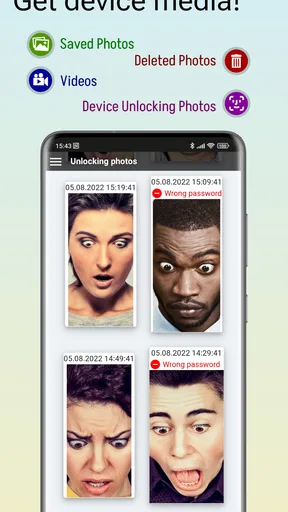
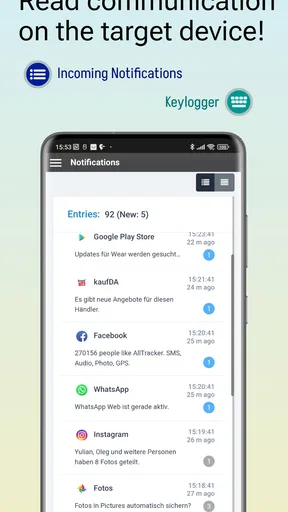
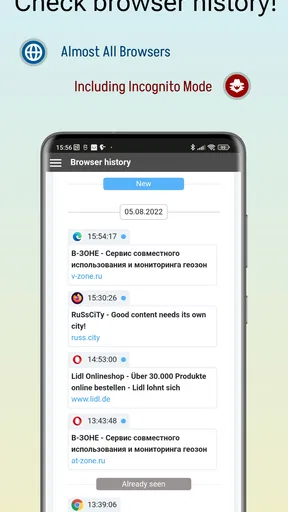
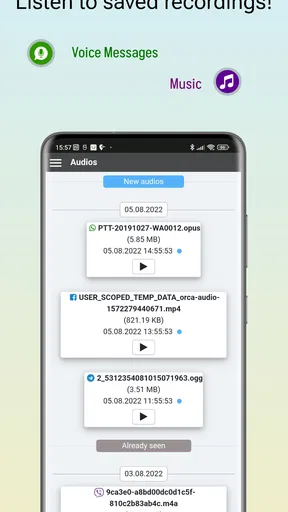
 Analysis by AppCompare
I think AllTracker Control Center makes the most sense when there is a clear, agreed reason to check on another device. For a parent, that might mean coordinating a teenager’s trip home; for a household, it could mean keeping track of a device shared by family members. The app is aimed at account management and monitoring target devices, so it is less like a general family calendar and more like a central place for overseeing connected devices. That distinction matters: it can help with visibility, but it is not a substitute for a conversation about boundaries and consent.
Start with a specific need, not every possible alert
Before setting anything up, I’d decide what I actually need to know and who should have access. Wanting a location check during a particular journey is a narrower goal than wanting constant access to every activity. Being specific makes it easier to decide whether this kind of parenting app fits, and it helps prevent alerts from becoming background noise. I would also explain the arrangement to the person using the monitored device, especially when that person is old enough to understand what is being shared.
That is one of the trade-offs with monitoring tools: more visibility can feel reassuring to the person checking, but intrusive to the person being checked on. In my view, the best setup is the least expansive one that still solves the real problem. If what you need is simply a way to agree on arrival times, a message or shared calendar may be enough. If you want a central account for managing monitored devices, AllTracker has a more relevant role.
A practical routine for a busy day
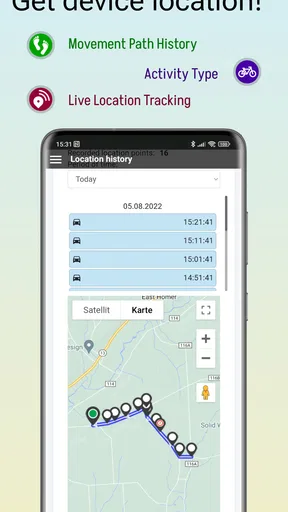
Picture a teenager travelling home after an after-school activity while a parent is finishing work. The parent can use the account to check the relevant device rather than repeatedly sending messages, then focus on a notification tied to the concern that matters. The useful outcome is not constant surveillance; it is less uncertainty around one ordinary handoff. For that routine to work, both people need to know what the app is being used for and what a notification means.
I would keep the routine simple: agree on the reason for monitoring, choose only the information and alerts that support that reason, and check the account at sensible moments rather than refreshing it compulsively. A monitoring app can show activity, but it cannot explain the context behind it. A missed alert, a delayed update, or an unexpected location should be a reason to ask calmly, not to jump straight to a conclusion.
Where it sits among parenting alternatives
Many parenting tools focus on a single job, such as screen-time limits, web filtering, or family location sharing. AllTracker’s appeal is its broader device-monitoring approach and account-management role. That breadth may suit someone who wants several kinds of visibility under one account, but it also makes the app a poor match if the only need is a simple location share or a lightweight conversation about screen habits. A focused tool can be easier to explain and less involved to manage.
I would not treat the app as a complete parenting system. It does not replace agreed household rules, direct communication, or a plan for what to do when something looks worrying. If a child needs a firm screen-time schedule, choose a tool designed around that task rather than assuming monitoring alone will change behaviour. If the priority is safety during a specific trip, a simple check-in may be all the family needs.
Worth Reading Before You Choose

Flipboard Shows What News Apps Must Do Beyond the Feed

Switching to Android Auto Means Rethinking Your Driving Routine

Google Calendar Makes a Crowded Week Easier to Manage

Ludo King Makes the Most of the Minutes Between Plans

Baby Panda World Brings Quick Play to Modern Phones, but Its Game Library Feels Busy

ESPN’s Live Game View Makes Following Close Games Easier
Small choices that make monitoring more useful
A practical tip is to decide in advance which alerts deserve attention. When every possible event becomes urgent, it is easy to ignore the notifications that matter. I’d also review the setup after a change in routine, such as a new school commute or a different after-school schedule, so monitoring continues to serve a real purpose instead of running on autopilot. This kind of periodic check is especially useful when more than one device or caregiver is involved.
Another useful distinction is between an account manager and the device being monitored. The person setting up the account needs to understand the process, while the person carrying the target device needs a clear explanation of the arrangement. If a family cannot agree on those roles, adding more monitoring is unlikely to resolve the underlying problem. In that case, a shared check-in plan is the better first step.
It is also worth thinking through handoffs. If one caregiver checks the account and another responds to an alert, they should agree on who will contact the device user and how. Otherwise, two adults may send repeated messages about the same event, or each may assume the other has handled it. A simple household rule—one person follows up, then shares the outcome—can keep the app from adding confusion to a busy day.
Hey there! Today, I’m diving into an app called AllTracker Control Center. If you’ve ever wanted a comprehensive way to keep tabs on your devices, you might want to stick around and see what this app has to offer. I’ve taken it for a spin, and here's my take on it.
What’s the Buzz About AllTracker Control Center?
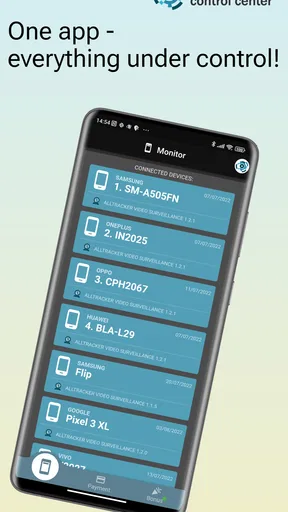
So, AllTracker Control Center is like your digital Swiss Army knife for device monitoring. It's designed for folks who want to keep an eye on multiple devices. Whether you’re a concerned parent, a team manager, or just someone who loves having control at your fingertips, this app aims to be your go-to solution.
Setting Up: Easy Peasy or Headache Inducing?
Let’s talk setup. You know how some apps make you jump through a million hoops before you can even start? Thankfully, AllTracker isn’t one of them. The installation was straightforward. After downloading from the store, you just need to create an account and add the devices you want to monitor. A couple of taps here and there, and you’re all set.
One thing I found really helpful was the guided tutorial that kicks in once you start the app. It’s pretty intuitive, so you won’t feel like you’re navigating a maze blindfolded. Trust me, if I can figure it out without pulling my hair out, so can you.
Diving Into the Features
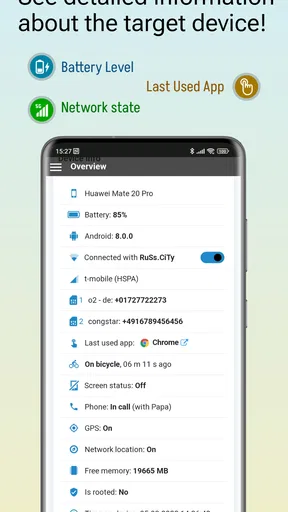
Now, let’s get to the meat of it—the features. This app is packed with tools that let you monitor calls, messages, location, and more. You can even use it to keep an eye on app usage. Each feature is laid out in a way that’s easy to access and understand.
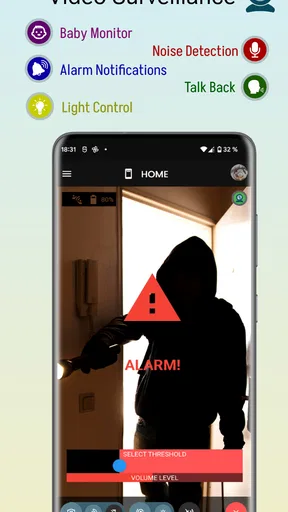
One feature I found particularly cool is the ability to receive notifications for specific activities. So, if you’re waiting for your teenager to get home or need updates on a work device, this app has your back. You can customize these alerts to suit your needs, making sure you’re only notified about the stuff that matters to you.
Performance and User Experience
Let’s talk performance. I’ve tried a fair share of monitoring apps, and some of them can slow your device down to a crawl. Thankfully, that’s not the case here. AllTracker Control Center runs smoothly in the background, doing its thing without eating up all your device’s resources. It’s like having a silent, efficient assistant working round the clock.
The user interface is sleek and modern, which is always a plus in my book. The developers clearly put some thought into making sure everything is easy on the eyes and straightforward to navigate. Everything is where you’d expect it to be, which means no hunting around for that one elusive setting.
Security and Privacy: How Safe Are You?
Alright, let’s talk about security because, honestly, who isn’t a little paranoid about privacy these days? The app implements multiple layers of security to protect your data. You can rest a bit easier knowing that your information isn’t just floating around in the digital ether.
However, I always recommend double-checking privacy policies before diving fully in. It’s better to be safe than sorry, right?
Final Thoughts
So, is AllTracker Control Center worth your time? If you’re someone who needs to monitor multiple devices for whatever reason, I’d say give it a shot. It’s user-friendly, feature-rich, and doesn’t bog down your device. Plus, peace of mind is always a good thing to have.
If you’re ready to dive into the world of seamless device monitoring, you might just find that this app fits the bill perfectly. Happy tracking!
Cost, platform fit, and the decision to try it
AllTracker Control Center is a free app from ragimov.software, with optional in-app purchases listed from $0.99 to $54.99 per item. I would treat the free download as a chance to inspect the account workflow, not as proof that every monitoring function is included at no cost. Before relying on it, check the current purchase details in the app and decide whether the available options match the particular devices and routine you have in mind.
The app has a 4.7 average from around 900 ratings, and it has passed 10,000 installs. Those figures suggest that people have found it useful, but they cannot tell me whether its approach is right for a particular family. It is rated Teen, runs on Android 7.0 or later, and version 1.7.7 is the current release. The app first appeared on January 31, 2022. I’d use those details as a compatibility and context check, then judge the fit by the setup and the boundaries your household is comfortable with.
One limitation to keep in mind is that monitoring depends on the target device and account arrangement working as expected. If a phone is unavailable, its user has no connection, or the person carrying it does not cooperate with the agreed plan, the account cannot replace direct contact. That is why I would keep a backup such as a planned call or message for important journeys rather than making the app the only way to confirm someone is safe.
I would also separate “something happened” from “I know why it happened.” A notification can prompt a useful check-in, but it is not a full explanation of someone’s day. For younger children, a caregiver may need more direct guidance and supervision; for older teens, trust and clear limits matter more than collecting the most information possible. If your household’s main goal is to build independence, a mutually agreed check-in routine may be more appropriate than ongoing device monitoring.
For teams or other non-parenting situations, I’d be cautious about assuming that a family-oriented monitoring pattern is suitable. A work device brings different expectations around consent, ownership, and acceptable use. Make sure everyone involved understands the arrangement and that it fits the rules that apply to that device. When those expectations are unclear, a purpose-built device-management option or a straightforward policy may be a better choice.
My take after weighing the workflow
What I like most is the possibility of bringing account oversight and several kinds of device activity into one place, rather than piecing together separate tools. What I like less is the responsibility that comes with that breadth: someone has to configure it thoughtfully, keep alerts relevant, and handle sensitive information with care. That balance is why I see it as a tool for a defined need, not something every parent should install by default.
Pros
- Comprehensive tracking features.
- User-friendly interface design.
- Works across multiple devices.
- Real-time data updates.
- Highly customizable settings.
Cons
- Subscription required for full features.
- Could drain battery quickly.
- Complex for tech novices.
- Privacy concerns for some users.
- Limited free version capabilities.
FAQs for AllTracker Control Center
What is AllTracker Control Center, and how does it work?
AllTracker Control Center is a comprehensive monitoring app designed for both Android and iOS platforms. It allows users to track various activities on their devices, such as location, calls, and messages. The app works by installing a client on the target device and accessing data remotely via the Control Center app, providing a centralized dashboard for all monitoring activities.
Is AllTracker Control Center safe to use on my device?
Yes, AllTracker Control Center is designed with user safety in mind. It employs encryption to protect your data and ensures that only authorized users can access the information. However, it's essential to download the app from the official website or app store to avoid any security risks from unofficial sources.
Can I use AllTracker Control Center on multiple devices?
Yes, AllTracker Control Center supports multiple devices. Users can monitor several devices simultaneously from a single account. This feature is particularly useful for families or businesses that need to keep track of various devices at once, providing a unified interface to manage all connected devices.
Do I need technical expertise to set up AllTracker Control Center?
No, AllTracker Control Center is user-friendly and designed for easy setup. The app provides step-by-step instructions and a straightforward interface that guides users through the installation and configuration process. Even those with minimal technical knowledge can set up the app with ease.
What kind of customer support is available for AllTracker Control Center users?
AllTracker Control Center offers comprehensive customer support to assist users with any issues or questions. Support is available through email, live chat, and FAQs on their website. The support team is responsive, aiming to resolve inquiries quickly and efficiently, ensuring a smooth user experience.


